Solution
How SOW Studio turns discovery into a signature-ready SOW
One connected workflow, in the order the work actually happens. Every screen below is the real SOW Studio application — click any preview to view it full size.
No credit card required. Full Professional capabilities for 14 days.
Capture Discovery
Nothing said in the room gets lost
Scoping rarely happens in one meeting. Collect transcripts, meeting notes, audio recordings, and supporting documents across every discovery session in the engagement, so context accumulates in one place instead of scattering across inboxes and drives.
- Transcripts, written notes, audio recordings, and supporting documents
- Multiple discovery sessions across weeks, attached to one engagement
- Source material stays traceable behind everything it produced
Turn Discovery Into Requirements
Fewer requirements lost between the call and the estimate
SOW Studio analyses the accumulated discovery context and proposes a structured view of the engagement: requirements and findings, assumptions, risks and open questions, and the scope intelligence that should influence the estimate. Your team reviews, edits, and approves.
- Requirements and findings grouped for efficient review
- Open questions surfaced before they become change orders
- Assumptions and risks captured for the SOW narrative
Build the Estimate
A credible number in the same sitting
The Estimation Worksheet is created from the discovery context and your company Services Catalog — then it stays yours to work in. Adjust lines, add services, change quantities and phases, and watch the totals respond before anything is approved.
- Drafted from your own services, structure, and rates
- Line-level editing with suggested and catalog entries side by side
- Phase and grouping structure that carries into the SOW
Add Estimation Intelligence
Works on day one, gets more precise as you mature
There are two paths, and only one of them requires setup. AI-assisted estimation works immediately with no formula rules at all. If your firm has — or wants to develop — an estimating methodology, you can add configurable estimation drivers and rules, with AI assistance to help build them. Formula-based estimation is optional, never a prerequisite.
- Path one: AI-assisted estimating from discovery context and your catalog
- Path two: configurable drivers such as integrations, environments, or record volumes
- AI can help draft rules from how your team already estimates
Collaborate Before You Commit
Agreement before the document exists
Present Mode turns the Estimation Worksheet into a clean review view you can walk through with internal reviewers or with the client. Trim a phase, revise an assumption, move scope to a later stage — the edits and the running total happen live, before anything is finalised.
- A presentation view that keeps internal mechanics out of the conversation
- Live edits during the review, reflected in the total immediately
- Decisions captured in the same record that generates the SOW
Generate the SOW
A document you would be happy to send today
Approved scope and estimate data become a professional Statement of Work, combined with your configurable clauses and legal content and the signature sections your process requires. Export to Word when legal or the partner wants final control of the wording.
- Configurable clause and legal content library, maintained once
- Engagement details and signature sections included
- Word (.docx) export for final editing and your signature process
Move From Sale to Delivery
Delivery starts from what the client actually signed
Project Handoff converts the accumulated discovery, approved scope, estimate, and SOW context into a delivery-oriented handoff summary — so the important context of the sale is not lost on the way to the project team.
- Executive summary, client snapshot, objectives, and success metrics
- Assumptions and exclusions preserved alongside the signed document
- A traceable line from discovery input to delivery kickoff
Workspace Setup
Configured once, so every engagement looks like your firm
Your workspace holds the Services Catalog, estimation rules, clause library, and branding used across the whole workflow — so client-facing views and generated documents carry your identity, not ours.
Insights
See what your SOW activity is telling you.
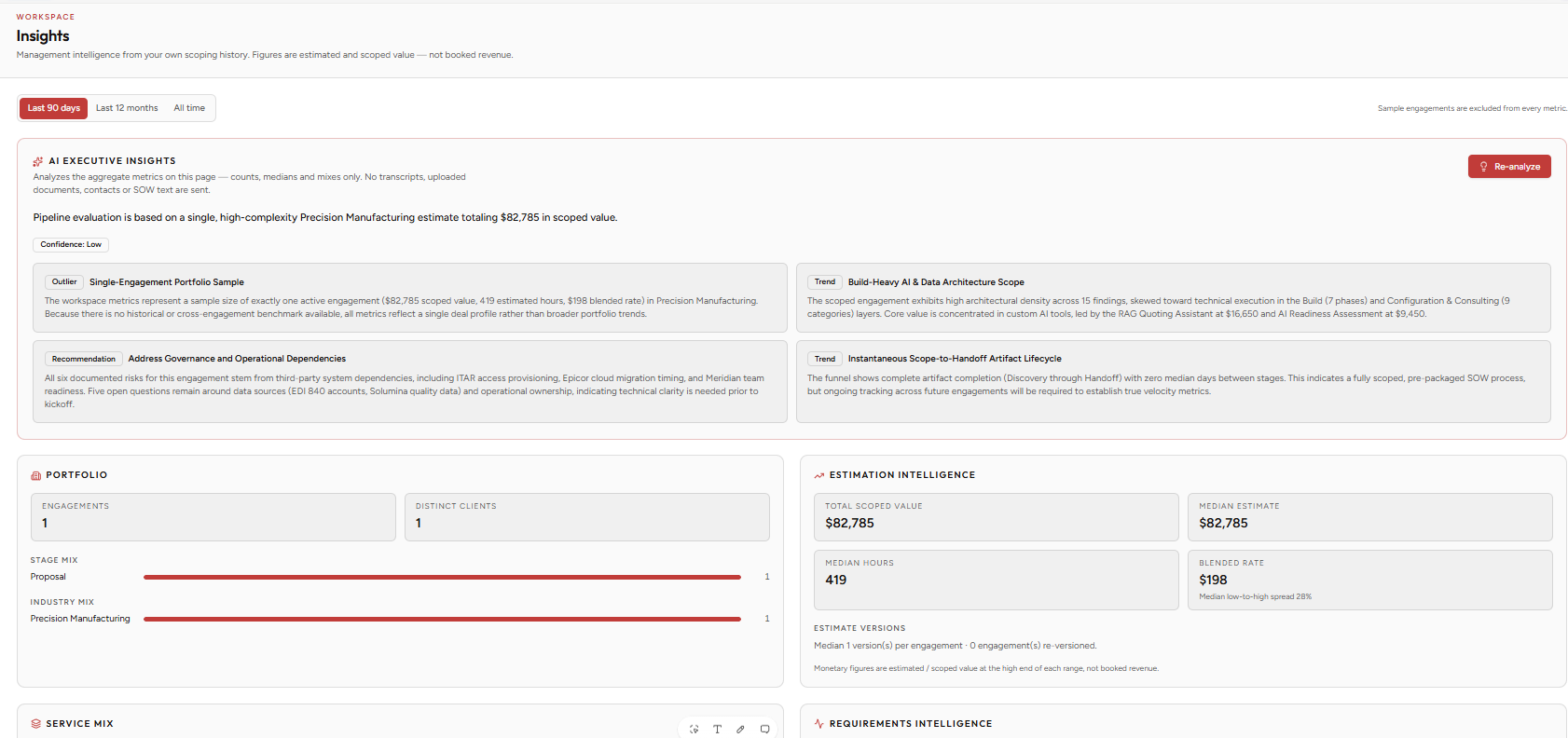
SOW Studio Insights turns the work your team is already doing into portfolio-level intelligence. Understand how engagements move from discovery through handoff, which services are driving activity and scoped value, where estimates tend to land, and which risks and scope patterns keep recurring.
From individual SOWs to portfolio intelligence
Every engagement creates useful data. Insights brings that information together so leadership can understand what the organization is scoping, how it is estimating, where the process slows down, and which patterns are repeating across projects.
- Portfolio visibility
- Estimation intelligence
- Scoping performance
- AI Executive Insights
Portfolio Visibility
See engagement volume, client mix, stage distribution, industry mix, and overall scoping activity across your workspace.
Estimation Intelligence
Understand typical estimate size, hours, blended rates, revision activity, and the services contributing the most scoped value.
Scoping Performance
See how engagements progress from Discovery to Estimate to SOW to Project Handoff — and how long each step typically takes.
AI Executive Insights
Use AI to surface meaningful trends, outliers, recurring patterns, and management recommendations from your aggregate scoping data.
SOW Studio helps your team create better SOWs. Insights helps your organization become better at scoping work.
Available with the SOW Studio Business plan.
See it on your own discovery notes.
Start a 14-day free trial with full Professional capabilities, or talk to us about your firm's estimating practice.
No credit card required · 14-day free trial